The ultimate guide to creator finances.
A complete resource for YouTubers, TikTok creators, influencers, streamers, and UGC creators who want to understand their income, manage creator expenses, handle creator taxes, and finally know their real profit.
Contents
Why creator finances are difficult
Traditional financial advice is built for people with one employer, one salary, and one tax form. Creators operate completely differently - and the financial tools available to them have never caught up.
Irregular income
AdSense, Creator Funds, and sponsorship payments don't arrive on a schedule. Some months are feast, some are famine - making budgeting nearly impossible without the right tools.
Platform dependency
An algorithm change or demonetisation can cut a creator's income overnight. Understanding what percentage comes from each source reveals real financial risk.
Delayed payments
Brand deals are often invoiced net-30 or net-60. Work delivered in January might not be paid until March, creating dangerous cash flow gaps.
Surprise tax bills
Without a system to estimate and set aside tax throughout the year, creators face devastating bills at tax time that wipe out months of savings.
Sponsorship unpredictability
Brand deals vary wildly in size, frequency, and payment timeline. Tracking each deal's true profitability after production costs is complex without dedicated software.
No clear profit picture
Revenue looks great on paper. But after platform fees, contractor costs, gear, software and taxes - what's left? Most creators genuinely don't know their actual take-home.
Understanding creator income streams
Modern content creators rarely earn from a single source. The most financially stable creators typically have 4–6 independent income streams. Here's a breakdown of the most common ones - and whether each is typically taxable.
| Income Type | Examples | Taxable? | Common Expenses |
|---|---|---|---|
| YouTube AdSense | Monthly payout from Google | Yes | Equipment, editing software |
| Sponsorships | Branded integrations, dedicated videos | Yes | Travel, props, contractor fees |
| TikTok Creator Rewards | Monthly TikTok fund payout | Yes | Equipment, subscriptions |
| Affiliate commissions | Amazon, LTK, discount codes | Yes | Software, marketing tools |
| Digital products | Presets, courses, ebooks | Yes | Platform fees, design costs |
| Memberships | Patreon, YouTube memberships, Substack | Yes | Subscriber perks, production |
| Coaching / consulting | 1-to-1 sessions, group workshops | Yes | Software, travel |
| UGC / freelance work | Paid content for brands | Yes | Props, studio, editing |
Revenue vs real profit
This is the most important concept in creator finance. Revenue is what arrives in your account. Profit is what you actually keep. Most creators only track revenue - and it's why so many feel broke despite earning well.
Example brand deal breakdown
Why this matters
Most creators would record this as a £2,000 month. But the real take-home is less than half that. Without tracking expenses per project, you lose visibility of where money goes.
Scaled up, this difference becomes enormous. A creator doing £5,000/month in deals might only be keeping £2,000–£2,500 after you properly account for costs and tax.
IncomeStudio's dashboard makes this visible in real time, per deal, per month.
See it in the demo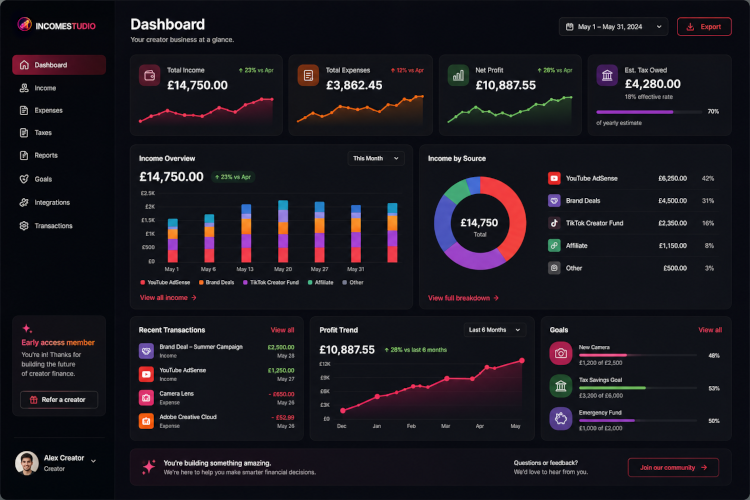
Creator expenses you can track & deduct
One of the biggest advantages of operating as a self-employed creator is that legitimate business expenses can reduce your taxable income. Here are the most common creator business expenses. Always consult a qualified accountant for your own situation.
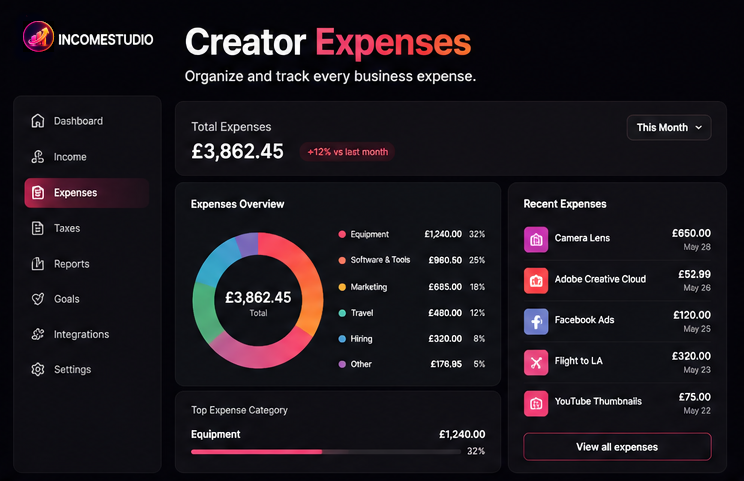
Track creator expenses in IncomeStudio
Log every expense by category, attach it to specific projects, and watch your real profit emerge automatically - no spreadsheet required.
See the Expense TrackerUnderstanding creator taxes
Creator taxes are one of the most stressful and misunderstood areas in the creator economy. Unlike traditional employees, creators don't have tax automatically deducted from their income. This means you are fully responsible for tracking, estimating, and paying your own tax.
Self-employment tax
In most countries, creators operating as sole traders or freelancers pay income tax on net profit (revenue minus legitimate expenses). In the UK this is reported via Self Assessment; in the US via Schedule C.
Setting money aside monthly
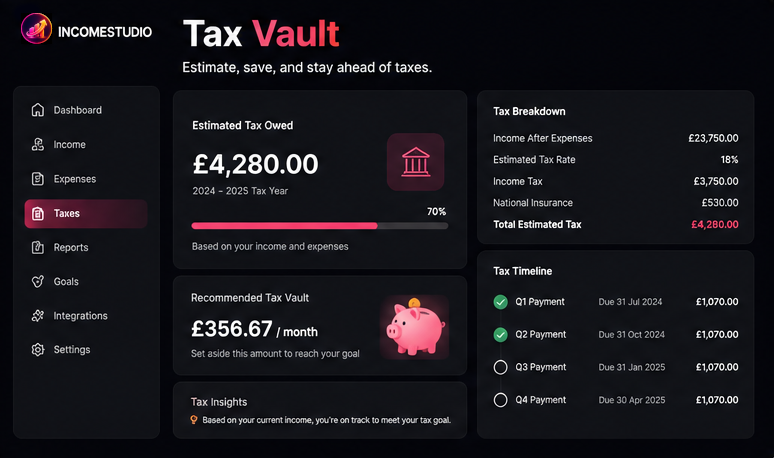
The most reliable system: set aside a fixed percentage of every payment the moment it lands. A common starting point is 25–30% of net profit. IncomeStudio's Tax Vault helps calculate this automatically.
Keeping digital records
Tax authorities increasingly require digital records. Keep receipts, invoices, bank statements, and payment confirmations for every transaction. Store them digitally and backed up.
Deductible business expenses reduce your tax bill
Every legitimate business expense reduces your taxable profit. A creator spending £3,000 on gear, software, and a freelance editor on a £10,000 revenue month pays tax on £7,000, not £10,000.
Creator finance checklist
Use this checklist to build a solid creator finance foundation from day one.
IncomeStudio helps you tick every box automatically.
Join the waitlistFrequently Asked Questions
Common questions about creator finance, influencer taxes, and content creator bookkeeping.
Do content creators pay tax?
Yes. Content creators are self-employed and responsible for paying income tax and, where applicable, National Insurance or self-employment tax on all earnings - including YouTube AdSense, sponsorships, affiliate commissions, and digital product sales.
How much tax should influencers save?
A general rule of thumb is to save 25–30% of net profit for taxes. This varies by country and income level. IncomeStudio's Tax Vault helps you estimate a monthly amount to set aside so you're never caught off guard.
Can creators deduct equipment as a business expense?
Yes. Equipment used for content creation - cameras, microphones, lighting, and computers - is generally tax-deductible as a business expense. Always consult a qualified accountant for your specific situation.
What expenses can YouTubers claim?
YouTubers can typically claim cameras, microphones, editing software, internet, travel for filming, props, contractor/editor fees, home office costs, and subscription tools as business expenses.
How do I track sponsorship income?
Log each deal with the brand name, contracted amount, delivery date, and payment date. Deduct any production costs tied to that deal to understand your true profit from each sponsorship.
Ready to take control of your creator finances?
Join early creators getting first access to IncomeStudio - the creator finance dashboard built for the creator economy.